Doing your sole trader tax return for the first time can feel daunting. The good news: Self Assessment is more manageable than it looks, and it gets easier each year once you’ve been through it.
This step-by-step guide to sole trader Self Assessment shows you how to do a Self Assessment tax return online, from logging into HMRC to hitting submit, in plain English.
A note from Anita, Chartered Accountant. Leaving your tax return until January brings panic, but it doesn’t have to. There are a lot of boxes, so it can feel overwhelming. The key is to take it as slowly as you can. Take a break if you need to and come back to it.
Disclaimer: I’m a Chartered Accountant, but I’m not your accountant. This guide is for information and guidance purposes only. Everyone’s situation is different. If you’re unsure about anything specific to your circumstances, speak to a qualified professional.
Table of Contents
Note: This guide is for the 2025/26 tax return (6 April 2025 to 5 April 2026), which is due online by 31 January 2027. Not registered for Self Assessment yet? Start with how to register.
Sole Trader Tax Return: The Key Deadlines
Get these in your diary before anything else:
|
Deadline |
What it’s for |
|---|---|
|
5 October 2026 |
Register for Self Assessment if you haven’t already |
|
31 October 2026 |
Paper tax return deadline (2025/26 tax year) |
|
31 January 2027 |
Online tax return deadline + pay any tax owed |
|
31 July 2027 |
Second payment on account (if applicable) |
The online deadline is 31 January 2027. The October dates above have already passed for this year, so the online return is the one to aim for. If you are also employed and want HMRC to collect what you owe through your tax code, file by 30 December 2026.
If you file late, HMRC charges £100 straight away, even if you have no tax to pay. After 3 months it adds £10 a day, up to £900. After 6 months, and again after 12 months, it adds 5% of the tax due or £300, whichever is higher. Paying late brings separate charges and interest. See GOV.UK’s penalties page and our guide to Self Assessment deadlines.
What You Need Before You Start
Getting everything together before you log in makes the process much faster. Here’s the short version. For the full list, with a free one-page PDF to tick off, see our Self Assessment checklist.
You’ll need your UTR, your National Insurance number and your Government Gateway login. Have your total business income and total allowable expenses for 6 April 2025 to 5 April 2026 to hand, plus details of any other income, such as a P60, bank interest or dividends.
The easiest way to have this information ready: Good accounting software keeps your income and expenses organised throughout the year, so when January comes, your numbers are already in order. Members of The Self Employed Club get 90% off Xero for 6 months: grab the deal here →
Step 1: Log Into Your HMRC Government Gateway Account
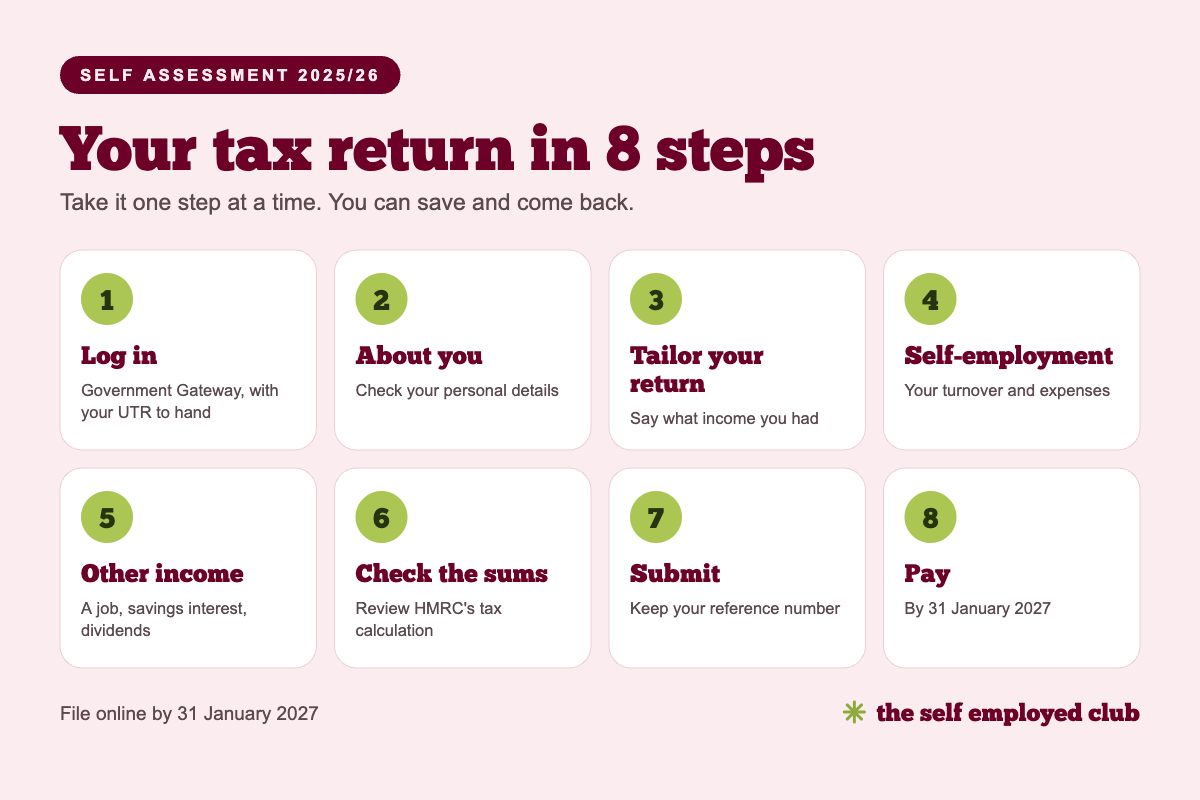
Go to gov.uk/log-in-file-self-assessment-return and sign in with your Government Gateway user ID and password.
If you’ve forgotten your user ID or password, HMRC has a recovery process on the same page. Have your UTR and National Insurance number to hand. You’ll need them to verify your identity.
Once logged in, go to Self Assessment and select Complete your tax return for the relevant tax year.
Step 2: “Tell Us About You”
The first section asks you to check and confirm your personal details: name, address, date of birth, National Insurance number.
Most of this will be pre-populated if HMRC already has it on file. Check it carefully and correct anything that’s changed, particularly your address if you’ve moved.
What to do:
- Check all personal details are correct
- Confirm you’re a UK resident
- Add student loan repayment details if applicable (your plan type and whether you’re employed or self-employed)
- Tick blind person’s allowance if you’re entitled to it
Step 3: “Tailor Your Return”
This section tells HMRC what types of income you received during the year. You won’t enter any numbers here. It just generates the right sections for you to fill in later.
Page 1, Sources of income:
- Select Yes for self-employment and enter the number of businesses you run and their names
- Select Yes for employment if you had any PAYE employment during the year
- Select any other income types that apply (property, partnerships etc.)
If your self-employment turnover is £1,000 or less: you can use the trading allowance instead of claiming your expenses. It is only worth doing if your expenses are also under £1,000.
Page 2, Other income:
- Tick if you received bank interest, dividends, pension income, or Child Benefit (if relevant for the High Income Charge)
- Add pension contributions you’ve made, as this gives you additional tax relief
Page 3, Tax reliefs:
- Any other reliefs you want to claim (Gift Aid donations, venture capital trusts, etc.)
Step 4: Complete the Self-Employment Section
This is the core section for sole traders, where you enter your business income and expenses for the year. It’s also where most people slow down, so it’s worth taking it section by section.
Short Form (SA103S) vs Full Form (SA103F)
If your turnover is under £90,000: You can use the short self-employment pages (SA103S). You enter your total income and a single total figure for all allowable expenses, with no category breakdown required. Much quicker.
If your turnover is £90,000 or over: You must use the full pages (SA103F) and break expenses down into HMRC’s specific categories.

Join the Club — it’s completely free
Members get handpicked deals and discounts on the tools, services and everyday essentials UK self-employed people actually use. Free to join, no catch.
Preliminary Questions
Before you enter any numbers, HMRC asks a series of questions to understand your business setup. Most sole traders can answer no to most of these. The ones most likely to apply:
Cash basis or traditional accounting: cash basis means you record income when you receive it and expenses when you pay them. It is now the standard method for sole traders, so you only need to tell HMRC here if you used traditional accounting instead (recording income and costs by invoice date). If you’re unsure, read GOV.UK’s guide to the cash basis.
“My total turnover is £1,000 or less but I wish to pay voluntary Class 2 NICs”: if your turnover is under £1,000 and you’re using the trading allowance, tick this if you want to protect your State Pension entitlement by paying voluntary Class 2 contributions.
Declaring Your Business Turnover
Your turnover is your total business income before expenses, not your profit. It includes everything you were paid for your work during the tax year:
- Invoices paid by clients (if you need one, use our free sole trader invoice template)
- Cash payments received
- Payments via PayPal, Stripe, or other platforms
- Any expenses you recharged to clients (include these in turnover, then claim them back as expenses, so they cancel out)
What doesn’t go in turnover:
- Bank interest (goes in the savings section)
- Dividend income (goes in the investments section)
- Rental income (goes in the property section)
Other business income: money earned through your business that isn’t your core trading income goes in a separate “other business income” box. For example, subletting part of your office space.
Claiming Your Business Expenses
If you’re using the short form (turnover under £90,000), add up all your allowable expenses and enter the total in one box.
If you’re on the full form, you’ll fill in HMRC’s expense categories, things like staff costs, premises costs, travel, advertising, and professional fees.
Either way, only include expenses that are wholly and exclusively for business purposes. Mixed-use expenses (phone, broadband, home office) should be the business proportion only.
If you claimed the Trading Income Allowance (turnover under £1,000), leave the expenses box blank. You can’t claim expenses and the allowance at the same time.
Not sure what you can claim? Read the full list of allowable expenses for sole traders →
Claiming Capital Allowances
If you bought equipment, tools, vehicles, or machinery for your business during the year, you may be able to claim capital allowances: a tax deduction for the cost of those assets.
The most useful one for most sole traders is the Annual Investment Allowance (AIA), which lets you deduct 100% of the cost of qualifying equipment in the year you buy it, up to £1 million. In practice, this means most equipment purchases can be fully deducted in the year of purchase.
Note: If you’re using the cash basis, you can’t claim capital allowances on most assets. The exception is cars. On the cash basis, you’d instead claim the actual cost of equipment as an expense in the year you pay for it.
Goods or Services for Personal Use
If you’ve taken any stock out of your business for personal use, or if any of your claimed expenses included personal costs you haven’t already adjusted for, note the value here. HMRC adds it back to your profit. If you’ve already removed personal use from your expense calculations, leave this blank.
Tax Losses
If your business made a loss this year (expenses exceed income), you have four options:
- Carry it forward: offset the loss against future profits. Most common choice.
- Carry it back: offset against profits from a previous year and potentially get a tax refund.
- Set it against other income: if you have employment income or other taxable income in the same year, you may be able to offset the loss against it.
- Set it against capital gains: in certain circumstances.
CIS Deductions (Construction Industry Scheme)
This section only applies if you’re a registered CIS subcontractor. If contractors have deducted CIS tax from your payments during the year, enter the total here. Make sure your turnover figure includes the gross amount (before CIS deductions). The deductions are then credited against your tax bill.
Class 4 National Insurance Exemption
Most sole traders pay Class 4 NIC automatically through Self Assessment. But you may be exempt if you were at or over State Pension age on 6 April 2025, or under 16. If an exemption applies, tick the relevant box. Otherwise leave it blank and HMRC calculates your Class 4 NIC automatically based on your profit.
Step 5: Complete Any Other Sections
Depending on what you ticked in the Tailor Your Return section, you may have additional pages to complete:
Employment (SA102): If you were also employed during the year, enter the figures from your P60 or P45: your gross pay and the tax deducted by your employer.
UK property income (SA105): If you received rental income, enter it here along with any allowable property expenses.
Savings and investments: Enter bank interest and dividend income in the relevant boxes. The personal savings allowance (£500 for higher rate taxpayers, £1,000 for basic rate) and dividend allowance (£500) mean many people won’t owe extra tax on these, but you still need to declare them.
Pension contributions: If you made personal pension contributions, enter the gross amount (what you paid plus the tax relief added by your provider). This gives you additional tax relief at your marginal rate.
Step 6: Review “Tax Calculation”
Before you submit, HMRC shows you a summary of your tax calculation: your total income, total deductions, taxable profit, and the tax and National Insurance you owe.
Check this carefully:
- Does your profit figure look right?
- Is the tax calculation in line with what you expected?
- Are there any payments on account shown? (These are advance payments towards next year’s bill. If your tax bill is over £1,000, HMRC adds two payments on account to your January bill, due in January and July)
If anything looks wrong, go back and check your entries. Common errors include entering turnover in the expenses box, entering income twice, or forgetting a category of income.
Want a rough figure before you start? Try our sole trader tax calculator.
Read => Self-Employed Tax: How It Works and What You Need to Know
Step 7: Submit Your Return
Once you’re happy with the calculation, proceed to the final submission screen. You’ll see a declaration confirming the return is correct to the best of your knowledge. Read it, confirm it, and submit.
HMRC will send you a confirmation with a submission reference number. Screenshot or note this down. It’s your proof of filing.
Your return is now submitted. HMRC will process it and any questions will come by letter to your registered address.
Step 8: Pay Your Tax Bill
Filing and paying are two separate things. You can file in April and not pay until January, and many people do exactly this so they know their bill well in advance.
Payment deadline: 31 January 2027 for the 2025/26 tax year.
Ways to pay:
- Online banking / bank transfer: HMRC’s bank details are on your bill and at gov.uk/pay-self-assessment-tax-bill
- Direct debit: set up via your HMRC online account
- Debit card: pay online through your HMRC account
- BACS, CHAPS: for same-day or next-day payments
Allow enough time: Online banking payments usually clear the same or next day. Allow more time for any other method.
Don’t have a dedicated tax savings pot yet? A separate business bank account with savings spaces makes setting aside your tax bill automatic. Check business banking deals in The Self Employed Club →
Payments on account: If your bill is over £1,000, HMRC also requires two advance payments towards the following year: 50% in January (added to your current bill) and 50% in July. This catches many first-year filers by surprise. If you know your income is likely to be significantly lower next year, you can apply to reduce your payments on account through your HMRC account.
What If You Can’t Pay Your Tax Bill?
Don’t ignore it. HMRC has powers to escalate unpaid debt quickly, but they will work with you if you engage early.
Payment plan: once your return is filed, you may be able to spread your bill over monthly instalments. Check whether you can set up a payment plan online on GOV.UK, or contact HMRC as early as you can.
What If You Made a Mistake?
You can amend a submitted Self Assessment return within 12 months of the 31 January filing deadline. Log into your HMRC account, go to Self Assessment, and select the option to amend your return. HMRC will recalculate your bill automatically.
If you need to make a correction after the 12-month window, you’ll need to write to HMRC directly.
What About Making Tax Digital?
Making Tax Digital for Income Tax is being phased in from April 2026, starting with sole traders on higher incomes. It changes how you keep records and report to HMRC during the year. Your 2025/26 return is still filed in the way this guide describes.
Read => Making Tax Digital: What’s Changed and What You Need to Do
Make Next Year Easier
The best time to prepare for your next tax return is right now, not next January.
Three habits that make Self Assessment significantly less stressful, and one of them involves the Club:
1. Track income and expenses monthly: 20 minutes a month beats 12 hours in January. Accounting software does most of this automatically.
2. Set aside 25 to 30% of every payment for tax: into a separate pot, immediately, every time. Don’t touch it until January.
3. File early: you can file from April 6. The sooner you file, the sooner you know your bill and the more time you have to plan for it.
Get the tools to make this easier: Members of The Self Employed Club get 90% off Xero for 6 months: MTD-compatible accounting software that keeps your records organised year-round. Grab the deal →
Free income & expenses tracker
Our 2026/27 bookkeeping spreadsheet adds up your income and expenses and estimates your tax as you go. Plus a free allowable expenses cheat sheet. Tell us where to send it.
We’ll email you to confirm, then send the tracker. You’ll also get our Friday deals email for the self-employed. Unsubscribe any time. Privacy Policy
FAQs
When is the sole trader tax return deadline?
The online Self Assessment deadline is 31 January each year. For the 2025/26 tax year (6 April 2025 to 5 April 2026), the deadline is 31 January 2027. The paper return deadline was 31 October 2026.
How do I fill in a Self Assessment tax return online?
Log into your Government Gateway account at gov.uk, go to Self Assessment, and select the current tax year’s return. Complete the sections relevant to your income, check the tax calculation, and submit. HMRC sends a confirmation with a reference number.
What is the difference between SA103S and SA103F?
SA103S is the short self-employment form, available if your turnover is under £90,000. You enter total income and one total figure for all expenses. SA103F is the full form, required if turnover is £90,000 or over, where you break expenses down by category.
What happens if I miss the Self Assessment deadline?
HMRC charges £100 straight away, even if you have no tax to pay. After 3 months it adds £10 a day, up to £900. After 6 months, and again after 12 months, it adds 5% of the tax due or £300, whichever is higher. File as soon as you can to keep the penalties down.
What are payments on account?
Advance payments HMRC requires towards the following year’s tax bill: two payments of 50% of your previous year’s bill, due in January and July. They apply once your annual bill exceeds £1,000. In your first year, your January payment can be up to 150% of your annual bill. If you expect a lower income next year, you can apply to reduce them.
What if I can’t pay my tax bill?
Once your return is filed, you may be able to spread the cost with a payment plan. Check whether you can set one up online on GOV.UK, or contact HMRC as early as you can.
Want to Read More About Self-Employed Tax & Self Assessment?
If you’ve enjoyed this post you may like to read more about self-employed tax & self assessment. Here are some of my most popular blog posts on this topic…
- Allowable Expenses for Sole Traders (UK): Full List + Examples
- Self-Employed Tax: How It Works and What You Need to Know
- How to Register as Self-Employed in the UK: A Step-by-Step Guide
- How to Become Self-Employed in the UK: A Step-by-Step Guide
- Making Tax Digital for Sole Traders: Key Dates, Rules & How to Get Ready
- Deals and Discounts for Sole Traders: What’s Available in 2026

About the Author
Anita Forrest
Chief Deal Hunter
Anita is a Chartered Accountant, self-employed business owner and the person behind The Self Employed Club. She created the Club to help UK self-employed people spend less and keep more of what they earn, by bringing useful deals for their business and everyday life together in one place.
She writes about the things you actually need to know when you work for yourself, in the way she would want someone to explain them to her - clearly, simply and without the usual business waffle.
Join the Club — it's completely free
Members get handpicked deals and discounts on the tools, services and everyday essentials UK self-employed people actually use. Free to join, no catch.