10 Ways I Use ClickUp as a Self Employed Business Owner
I want to be honest about something before this starts.
I tried Asana. I tried Trello. Before either of those, I had a notebook — a proper one, with a pen, the kind of system that works brilliantly until you lose the notebook or can’t read your own handwriting from three weeks ago.
I’m not writing this because ClickUp asked me to. I’m writing it because it’s the tool that finally stuck, and I think I know why — and that might be useful to someone who’s been through the same rotation of apps and notebooks without finding anything that actually works.
The Self Employed Club runs on ClickUp. Every piece of content on this site, every partner deal, every bit of outreach, every deadline that could go wrong if I missed it — it all lives in ClickUp.
Here’s exactly how I use it.
Disclosure: The Self Employed Club has an affiliate arrangement with ClickUp. If you sign up through the Club you get 10% off a paid plan. That came after I was already using it, not before.
Table of Contents
Why I Ended Up on ClickUp (After Everything Else)
The pattern most self-employed people go through is something like: notebook → Google Keep → Trello → something more complicated → back to a notebook in a panic.
I went notebook → Asana → Trello → ClickUp.
Asana felt like it was designed for a team I didn’t have. Trello was fine for tasks but fell apart the moment I needed to see multiple things at once — different parts of the business, different timelines, different types of work. I’d end up with so many boards that finding anything became the problem I was trying to solve.
ClickUp did something the others didn’t: it gave me one workspace where genuinely different types of work could live side by side, organised the way I think about the business — not the way the software wanted me to think about it.
That flexibility is what made it stick.
My ClickUp Setup — How It’s Structured
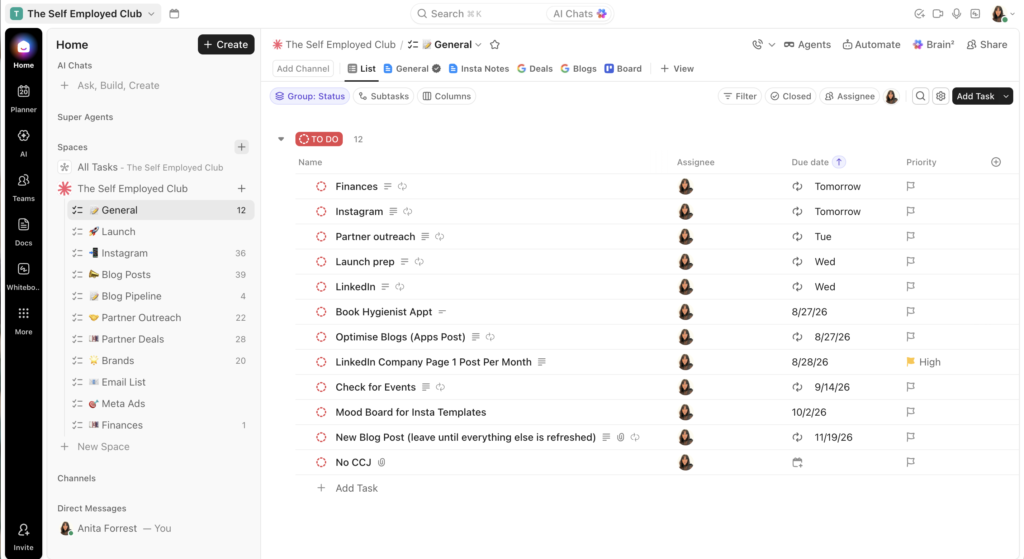
Before getting into the 10 ways I use it, it helps to understand the structure. ClickUp organises work into Spaces → Lists → Tasks. My main workspace is “The Self Employed Club” and everything lives underneath it.
The lists I use:
- General — daily recurring tasks and the rhythm of the week
- Blog Posts — every piece of content on the site, tracked and categorised
- Blog Pipeline — ideas that aren’t posts yet
- Partner Outreach — who I’m chasing and what the next action is
- Partner Deals — summary of every live deal, what’s on offer, where to track commission
- Instagram — content planning and scheduling
- Finances — deadline reminders and financial housekeeping
- Launch — project tracking for new things going live
Each one does a specific job. None of them overlap. That separation is the thing that makes the whole system work.
1. My Daily Recurring Tasks Keep the Business Ticking
The General list is the first thing I open every morning. It has recurring tasks assigned to specific days of the week:
- Monday: Instagram content creation
- Tuesday: Partner outreach
- Wednesday: Blog writing or refresh
- Thursday: Admin and finance review
- Friday: Week review and next week planning
Before ClickUp, I’d start each day trying to remember what kind of day it was supposed to be. Now I open ClickUp and it tells me. The recurring task structure means I never have to think about what I should be doing — I just do it.
This sounds simple. It is. But it’s the single thing that’s had the biggest impact on how consistently I show up in the business. Sole trader life is full of things that distract you from the work that matters. Knowing what kind of day it is before you open your inbox is more valuable than it sounds.
2. Every Blog Post Has Its Own Task With a Full History
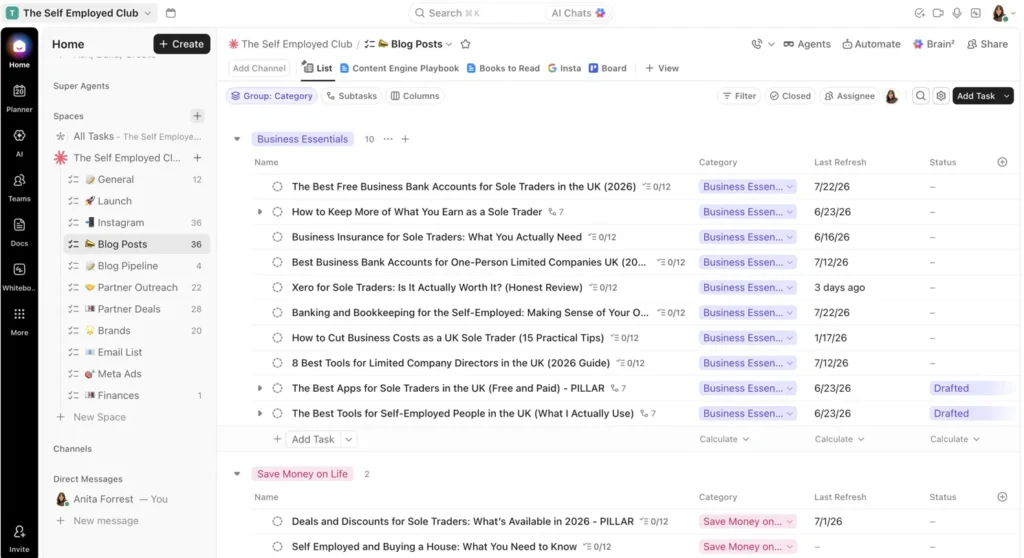
The Blog Posts list is where content management happens. Every post on the site has its own task — with the category, the last refresh date, the status, and any notes about what needs updating.
Looking at it right now, I can see 36 posts grouped by category: Business Essentials, Save Money on Life, Grow Your Money, Sole Trader Life, Tax & Self Assessment. I can see which ones were last refreshed in January and probably need attention. I can see which ones are drafted but not yet live.
Before this system, I had no reliable way to know when I’d last updated something. Posts would go stale without me noticing. Now I have a single view that tells me the state of everything on the site at a glance.
The grouped categories view was one of the reasons I upgraded from the free plan. Worth it immediately.
Get 10% off ClickUp paid plans through The Self Employed Club →
3. The Blog Pipeline Is My Idea Dumping Ground
Every time I have an idea for a post — in the car, in the middle of the night, reading something that sparks a thought — it goes into the Blog Pipeline list. No structure, no pressure, just capture.
Right now the pipeline has four ideas in it: Tide v Mettle, QuickBooks v Xero, How I Use Google Workspace, How I Use ClickUp. (Meta, I know.)
The pipeline does one job: stop ideas from disappearing. When I sit down to plan the next post, I open the pipeline rather than trying to remember what I was thinking about three weeks ago.
4. Partner Outreach Tracks Every Conversation
Running a deals platform means a lot of outreach — brands I’m approaching, applications I’ve submitted, follow-ups I need to send, relationships I’m building. Before ClickUp, this lived in a combination of my inbox and my head. Both of those are unreliable.
The Partner Outreach list has a task for every brand I’m in contact with. Each task has notes on where the conversation is, what the next action is, and when I last followed up. The list currently has 22 items.
The practical benefit: I never forget to follow up. I never let a warm conversation go cold because I got distracted. I open the list on Tuesday (outreach day) and I know exactly what I’m doing.
5. Partner Deals Is My Single Source of Truth
The Partner Deals list is a summary of every live deal on the platform — what the partner offers, what the commission structure is, where to find the tracking dashboard, and any notes about the relationship.
This is the list I’d feel most lost without. As the platform grows and more deals come on board, having everything in one place rather than scattered across emails and browser bookmarks is what keeps things manageable.
It currently has 28 items. Each one is a task with a description, relevant links, and notes. When I need to check a commission rate or find an affiliate link, I go to this list. Takes ten seconds.
6. Google Docs Live Inside ClickUp Tasks
This is the integration that changed everything about how I work.
When I’m working on a blog post, the Google Doc for that post is embedded directly inside the ClickUp task. I don’t switch apps to find the document — it’s right there, inside the task it belongs to, alongside all the notes and status information for that post.
Same for spreadsheets. The financial tracking spreadsheet for the Club lives inside the Finances list. Partner commission spreadsheets live inside Partner Deals tasks. Everything is where it should be rather than in a Drive folder I have to remember to navigate to.
The friction of switching between apps is small in isolation. Across a working day, it adds up. Having the document inside the task removes it entirely.

Join the Club — it’s completely free
Members get handpicked deals and discounts on the tools, services and everyday essentials UK self-employed people actually use. Free to join, no catch.
7. Finance Deadlines Never Get Missed
The Finances list is simple: deadline reminders for the things that matter financially. Corporation Tax deadline. VAT quarter. Self Assessment. Annual accounts.
Each one is a task with the deadline date set. ClickUp reminds me in advance. I never miss a financial deadline and I never have to hold these dates in my head.
As a Chartered Accountant I find it faintly amusing that the thing I recommend to clients for keeping on top of their tax deadlines is the same system I use for running a deals platform. But it works for the same reason in both cases: the dates are written down somewhere reliable, and something reminds you before it’s too late.
Get 10% off ClickUp paid plans through The Self Employed Club →
8. Instagram Content Planning Stays Visible
The Instagram list has 36 items — content ideas, scheduled posts, things that performed well and are worth revisiting, captions I’ve drafted.
I’m not a natural content planner. Left to my own devices I’d create things reactively — when inspiration strikes, when there’s news to share, when I remember. ClickUp makes planning visible enough that I actually do it. Monday is content creation day; I open the Instagram list and I know what I’m working on.
The Board view is useful here — I can see content at different stages (idea, drafted, scheduled, live) as columns, which gives a clearer sense of the pipeline than a list does.
9. The Free Plan Is Genuinely Useful — But I’m on Paid
ClickUp’s free plan includes unlimited tasks, basic project management, and collaborative docs. For a sole trader just starting out, it’s more than enough to build the kind of system I’ve described.
I’m on a paid plan — the Unlimited plan — and the things that made it worth upgrading for me were:
- Custom fields — so I can add “Last Refresh” and “Category” columns to the Blog Posts list
- Grouped views — so I can see posts organised by category rather than just a flat list
- More automations — useful for recurring task patterns
The free plan doesn’t have these. For a simpler setup, the free plan is fine. For the kind of detailed content and business tracking I do, the paid plan earns its cost.
The 10% Club discount applies to paid plans. Get it here →
10. It’ll Scale When I’m Ready to Grow
This is the thing I think about least right now but will matter most later.
When I’m ready to bring someone in — a VA, a content writer, someone to help with outreach — ClickUp handles it. I can add a user, assign tasks to them, chat within tasks, and manage their work without switching to a different platform.
Right now I’m the only user. The workspace is set up for one person. But the structure I’ve built — the lists, the categories, the recurring tasks — is already the kind of setup that a second person could step into without me having to rebuild everything from scratch.
That’s not an accident. One of the principles I believe in for running a self-employed business is building systems that don’t depend entirely on you. ClickUp is the system I’m building those habits around.
What I’d Tell Someone Starting Out
Don’t try to build the whole system on day one. I didn’t.
Start with one list — whatever the most chaotic part of your business is right now. If you’re losing track of client projects, start there. If you’re forgetting to follow up on things, start with that. If you have ideas disappearing into the void, start a pipeline list.
Build the other lists as you need them. The system I use now took months to develop into its current shape. It works because it evolved alongside the business, not because I designed it all upfront.
The free plan is a perfectly good place to start. You can decide whether the paid features are worth it once you’ve lived in the system for a while.
And if you’ve been through the Asana-Trello-notebook cycle already — welcome. You’ve found the thing that sticks.
Get 10% off ClickUp paid plans through The Self Employed Club →
FAQs
Is ClickUp free for sole traders?
Yes — ClickUp has a genuinely usable free plan with unlimited tasks, basic project management, and collaborative docs. It’s more than enough for most sole traders starting out. Paid plans start at around $10/user/month and unlock features like custom fields, grouped views, and more automations.
Is ClickUp worth paying for as a sole trader?
Depends on your setup. The free plan is genuinely usable for most people. I upgraded to the paid plan for custom fields, grouped views, and more automations — specifically for the way I track blog content and partner deals. If your use is simpler, the free plan is fine. If you’re tracking multiple types of work in detail, the paid plan earns its cost.
Where can I get a ClickUp discount?
The Self Employed Club — members get 10% off ClickUp paid plans. Get the deal →
Want to Read More About Business Essentials for the UK Self Employed?
If you’ve enjoyed this post on how I use ClickUp to run The Self Employed Club, you may like to read more business essential guides. Here are some of my most popular blog posts on this topic…

About the Author
Anita Forrest
Chief Deal Hunter
Anita is a Chartered Accountant, self-employed business owner and the person behind The Self Employed Club. She created the Club to help UK self-employed people spend less and keep more of what they earn, by bringing useful deals for their business and everyday life together in one place.
She writes about the things you actually need to know when you work for yourself, in the way she would want someone to explain them to her - clearly, simply and without the usual business waffle.
Join the Club — it's completely free
Members get handpicked deals and discounts on the tools, services and everyday essentials UK self-employed people actually use. Free to join, no catch.