Google Workspace for Sole Traders UK: Is It Worth It?
Do you actually need Google Workspace when you’re a sole trader, or will a free Gmail account do the job?
It’s a fair question. When you work for yourself, every subscription is another business expense, and the last thing you need is to pay for software you barely use.
I switched to Google Workspace when I was setting up The Self Employed Club. I wanted a professional email address using my own domain, but I ended up using far more of it than I expected.
So, is Google Workspace worth paying for when you’re running a business on your own? Here’s what I use, what it costs and when I’d stick with free Gmail instead.
Disclosure: I’m a genuine Google Workspace customer and use it to run my business. The Self Employed Club also has a referral arrangement with Google Workspace. If you sign up through our Club offer, we may earn a commission at no additional cost to you.
Get 10% off Google Workspace + a 14-day free trial
Thinking of giving Google Workspace a go? The Self Employed Club has an offer for eligible UK self-employed members.
Table of Contents
What Is Google Workspace?
Google Workspace is Google’s collection of business tools, including Gmail, Google Drive, Calendar, Docs, Sheets and Meet.
If you already use Google, most of it will feel very familiar. The main difference is that Workspace brings these tools together under your business account, with additional storage and administrative features.
One of the biggest benefits for sole traders is being able to use Gmail with your own domain name.
Instead of yourbusiness@gmail.com, you can have an email address such as hello@yourbusiness.co.uk.
You don’t need a limited company or any employees to use Google Workspace. You can sign up as a sole trader with just one user.

Join the Club — it’s completely free
Members get handpicked deals and discounts on the tools, services and everyday essentials UK self-employed people actually use. Free to join, no catch.
Google Workspace vs free Gmail: do you actually need it?
Before spending any money, it’s worth asking what you actually need.
Free Gmail already gives you access to some very useful tools. You can send emails, organise your calendar, create documents, use spreadsheets and store files in Google Drive.
For plenty of people starting out, that’s absolutely fine.
But there are a few reasons you might eventually want to move to Google Workspace.
|
Free Gmail |
Google Workspace |
|---|---|
|
Free personal Gmail address |
Professional email using your business domain |
|
15GB of storage |
30GB with Business Starter |
|
Access to Google’s everyday productivity tools |
Business account with additional management features |
|
Suitable for personal use and many new businesses |
Designed for businesses, including one-person businesses |
The biggest difference for me was getting a professional email address without having to learn a completely new email system.
But that wasn’t the only reason I stayed.
Why I switched to Google Workspace
Before switching, I had a slightly mismatched collection of tools.
I was using free Gmail for email, Dropbox for storing files and a calendar I wasn’t making particularly good use of.
Everything worked, but it wasn’t especially joined up.
When I started The Self Employed Club, I wanted an email address using my own domain. Rather than paying for separate email hosting and continuing with all my existing tools, I decided to give Google Workspace a try.
I gradually moved my files over from Dropbox, started making proper use of Google Calendar and connected Workspace with ClickUp, which I use for project management.
I haven’t felt the need to switch back.
Here are the four things I use most.
1. Professional business email
This was the original reason I signed up.
Having an email address ending in @theselfemployedclub.com makes the business feel more established, particularly when I’m contacting potential partners or sending business emails.
Of course, there’s nothing wrong with using a Gmail address when you’re starting out. Plenty of successful sole traders do.
But if you want an email address that matches your website and business name, Google Workspace is one way to get it.
And because the email itself runs through Gmail, I didn’t have to get used to a completely different system.
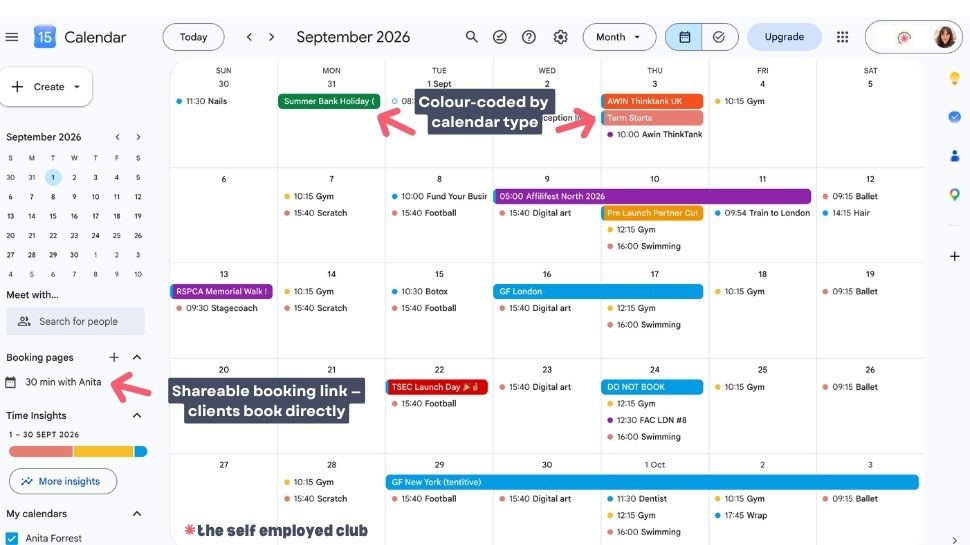
2. Google Calendar
This has probably been the biggest surprise. I originally signed up for the email, but Google Calendar has become one of the tools I use most throughout the working day.
My meetings, appointments and reminders are all in one place. I can add Google Meet links to calls and see my ClickUp tasks alongside my calendar.
I also use appointment scheduling so people can book calls without the endless back-and-forth of finding a time that suits us both. I’d previously tried Calendly, which worked perfectly well, but I prefer having my scheduling and calendar together.
It’s one less separate tool to manage.
If you regularly arrange calls with clients, suppliers or other business contacts, this is worth exploring.
3. Google Drive
I used Dropbox for years before moving my files over to Google Drive. Rather than migrating everything in one enormous job, I moved things gradually as I needed them.
Now I store documents, images and other business files in Drive, and I can share individual folders with people without giving them access to everything else.
Business Starter includes 30GB of pooled storage for one user. Your Gmail messages, Drive files and newer Google Docs, Sheets and Slides files all contribute towards that allowance.
For the way I work, it’s been enough, and I no longer need a separate Dropbox subscription. If you regularly work with large video files or have substantial storage requirements, though, you’ll want to look more closely at the available plans.
Join the Club — it’s completely free
Members get handpicked deals and discounts on the tools, services and everyday essentials UK self-employed people actually use. Free to join, no catch.
4. ClickUp Integration
I use ClickUp to organise projects and manage my work. Being able to connect it with Google Drive makes it easier to keep documents alongside the tasks they relate to.
I can attach Google Docs to tasks, open files from ClickUp and work on them without constantly searching through folders. It’s a small thing, but when you’re moving between projects throughout the day, those little conveniences add up.
You certainly don’t need ClickUp to get value from Google Workspace. But if you already use project management software that integrates with Google, it’s worth checking what you can connect.
How much does Google Workspace cost for a sole trader in the UK?
For most sole traders considering Google Workspace, Business Starter is the obvious place to begin.
At the time of updating this article, Google’s published UK pricing is:
- Business Starter £5.90/user/month on an annual commitment
- Business Standard £11.80/user/month on an annual commitment
Prices exclude VAT. Flexible monthly plans cost more, and promotional prices may vary. Check Google’s latest pricing before signing up.
to £5.31/user/month — and the 14-day free trial means you can try it properly before committing.
If you’re a sole trader using Business Starter on your own, that’s £70.80 a year before VAT.
Business Starter includes a professional email address, 30GB of storage, Google’s core productivity tools and video meetings. I use Business Starter, and it’s been sufficient for my needs.
Business Standard offers considerably more storage and additional features, including enhanced meeting and appointment-booking options.
Can you get a Google Workspace discount?
Yes. The Self Employed Club has a Google Workspace offer for eligible members.
Club deal: 10% off Google Workspace for your first year, plus a 14-day free trial.
The Club is free to join for verified UK self-employed people. Check the current offer and its terms before signing up.
See the Google Workspace deal in The Self Employed Club
Is Google Workspace worth it for sole traders?
I think it can be, but it depends on what you’re using already.
If all you need is an email address and somewhere to create the occasional document, free Gmail might be absolutely fine.
I’d consider Google Workspace if:
- You want a professional email address using your own domain.
- You already use Gmail and prefer to stick with familiar tools.
- You regularly arrange meetings or client calls.
- You want your email, calendar and file storage together.
- You’re currently paying separately for tools that Workspace could replace.
On the other hand, I wouldn’t rush to subscribe if you’re just starting your business and don’t have a clear reason to use it.
And if you’re already happily using Microsoft 365, there’s no need to switch simply because someone else prefers Google.
The question isn’t whether Google Workspace has lots of features. It’s whether you’ll actually use enough of them to justify another subscription.
Google Workspace vs Microsoft 365
Both are capable options for a one-person business.
I prefer Google Workspace because I already knew Gmail, I like Google Calendar and it works well with the other tools I use.
But Microsoft 365 may be more suitable if you regularly work with complex Excel spreadsheets, heavily formatted Word documents or rely on Microsoft’s desktop applications.
If you’re choosing between them, start with the software you already use most.
There’s little point switching everything over to Google if your working day revolves around Excel.
How to get started with Google Workspace
If you’ve decided Google Workspace is right for your business, there are a few things worth knowing before you sign up.
Get your domain name sorted – If you want a professional email address, you’ll need a domain name you own. Google Workspace can help you connect an existing domain, and domain-purchasing options may also be available during setup.
Choose the right plan – Business Starter is a sensible starting point if you mainly want professional email, calendar and file storage. Compare the plans if you need more storage or particular features.
Allow some time for setup – You’ll need to verify your domain and configure your email settings. Google provides instructions, and your domain provider should have guidance if you get stuck.
Move your files gradually – Unless you urgently need everything in one place, there’s no need to migrate years of documents in a single afternoon.
And once you’re set up, spend a little time exploring Google Calendar. It’s easy to focus entirely on the email and overlook some of the other useful tools you’re paying for.
My verdict: would I pay for Google Workspace again?
Yes, I would.
I originally signed up because I wanted a professional email address. What I hadn’t expected was how much I’d end up using Calendar, Drive and the connections with my other business tools. For me, the subscription has replaced other services and given me a setup I’m happy working with every day.
But I wouldn’t tell every sole trader to rush out and buy it.
If free Gmail does everything you need, keep using it. When you reach the point where you want your own business email address or find yourself paying for several separate tools, that’s when I’d take another look at Google Workspace.
And before you pay full price, check The Club.
Join The Self Employed Club for free and explore our Google Workspace offer
Correct as of September 2026. Prices, features and offers can change. Always check the provider’s latest terms and eligibility before purchasing.
FAQs
Can a sole trader use Google Workspace?
Yes. You don’t need to employ anyone or have a limited company. You can sign up with one user and use Google Workspace for your sole trader business.
Can I use Google Workspace for free?
Google Workspace is a paid service, although Google offers a free trial. You can use ordinary Gmail, Google Docs, Sheets, Calendar and other personal Google tools without paying for Workspace.
Do I need a business email address as a sole trader?
No. You don’t have to use a professional domain email simply because you’re self-employed. However, an email address that matches your business name can be useful if you regularly communicate with clients, suppliers and potential partners.
Do I need a domain before signing up?
Yes. Google Workspace connects to a domain you already own — it doesn’t provide one. Get a domain first (the Club has a 123 Reg deal for this), then set up Workspace. The whole process takes under an hour once you have both.
Is Google Workspace Business Starter enough for one person?
It may well be. Business Starter includes professional email, Google’s core productivity tools and 30GB of pooled storage per user. Check the other plans if you need substantially more storage or specific advanced features.
Can I keep my existing emails when I switch?
Google provides tools for migrating email from supported providers. Check the migration options for your current email service before making the switch, and make sure you have a backup of anything important.
Is Google Workspace better than Microsoft 365?
Neither is automatically the right choice for every sole trader. I prefer Google Workspace for the way I work, particularly Gmail, Calendar and its integration with ClickUp. But if you depend heavily on Excel, Word or Microsoft’s desktop applications, Microsoft 365 might make more sense.
More ways to spend less when you work for yourself
If you’re looking for useful tools, better deals or ways to make your life easier while keeping your business costs down, here are a few more guides you might find helpful.

About the Author
Anita Forrest
Chief Deal Hunter
Anita is a Chartered Accountant, self-employed business owner and the person behind The Self Employed Club. She created the Club to help UK self-employed people spend less and keep more of what they earn, by bringing useful deals for their business and everyday life together in one place.
She writes about the things you actually need to know when you work for yourself, in the way she would want someone to explain them to her - clearly, simply and without the usual business waffle.
Join the Club — it's completely free
Members get handpicked deals and discounts on the tools, services and everyday essentials UK self-employed people actually use. Free to join, no catch.