Here is a free sole trader invoice template you can use today, with a version for VAT if you are registered. Below it you will find what an invoice must include, a labelled example and how to get paid faster.
Free sole trader invoice template
An Excel file with two invoices, one plain and one for VAT. The totals and the due date add up for you. Tell us where to send it.
We’ll email you to confirm, then send the template. You’ll also get our Friday deals email for the self-employed. Unsubscribe any time. Privacy Policy
What is in the sole trader invoice template
- A plain invoice, for when you are not registered for VAT
- A VAT invoice, which shows your VAT number and the VAT on each line
- Totals and the due date worked out for you
- A short guide tab that lists what an invoice must include
This invoice template for sole traders opens in Excel, Google Sheets or Numbers. Type over the example details with your own, save a copy for each invoice and send it as a PDF.
The invoice is plain on purpose. You can change the fonts and colours or add your own logo so it matches your branding.
What a sole trader invoice must include
GOV.UK says an invoice must include:
- a unique identification number
- your name, address and contact information
- the name and address of the customer you are invoicing
- a clear description of what you are charging for
- the date the goods or service were provided (the supply date)
- the date of the invoice
- the amount or amounts being charged
- the VAT amount, if applicable
- the total amount owed
As a sole trader, the invoice must also show your own name and any business name you use. If you trade under a business name, it must give an address where legal documents can be delivered to you.
Source: GOV.UK, Invoicing and taking payment from customers (checked 12 November 2026).
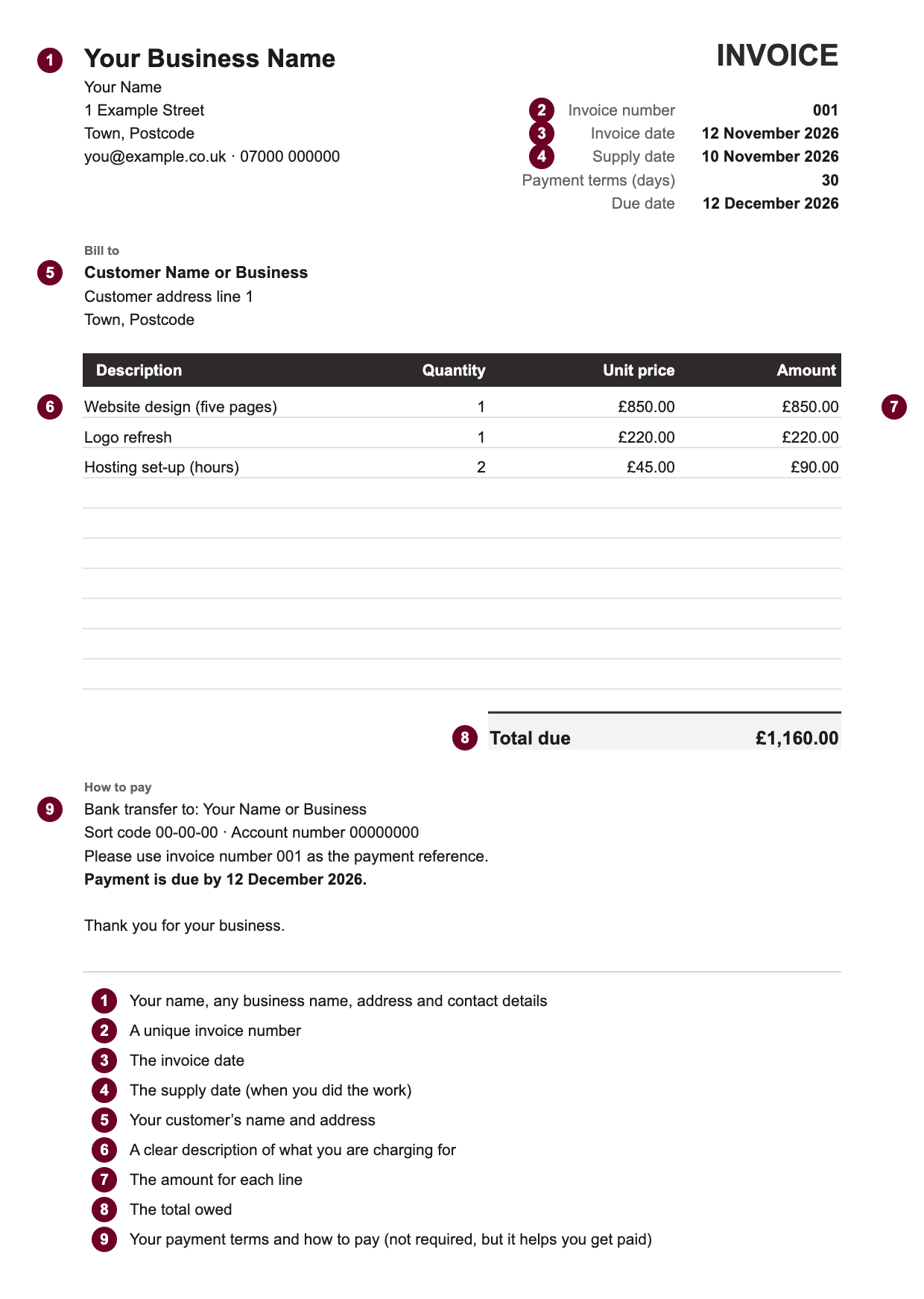
Sole trader invoice example
This is the template filled in, with a number on each thing an invoice needs so you can see where it goes.
How to invoice as a sole trader, step by step
- Number it. Give every invoice its own number and never use one twice. A simple run such as 001, 002, 003 works.
- Add your details and your customer’s. Your name, any business name, address and contact details. Then the customer’s name and address.
- Date it. Add the invoice date and the date you did the work or supplied the goods.
- Say what it is for. Describe the work clearly, with the quantity and price for each line.
- Show the total. If you are VAT registered, show the VAT separately.
- Say how and when to pay. Add your payment terms, the due date and your bank details.
- Send it and keep a copy. Send a PDF so it cannot be changed by mistake, and keep your copy with your records.
Do you need to charge VAT on a sole trader invoice?
Only if you are registered for VAT. If you are not registered, you cannot charge VAT and your invoice should not show any.
If you are registered, your invoice also needs your VAT number and must show the VAT separately. There is a fuller list of what a VAT invoice must show in HMRC’s VAT Notice 700/21. The VAT tab in the template covers the usual items.
Payment terms: when should you be paid?
You can set your own payment terms, such as 7, 14 or 30 days. Agree them with your customer before you start and print them on the invoice.
If you do not agree a date, GOV.UK says the customer must pay within 30 days of getting your invoice or the goods or service.
How to get paid faster
Most slow payments come down to something small. These habits take minutes and remove the usual excuses.
- Agree the price and terms in writing before you start. An email is enough. The invoice should never be a surprise.
- Ask who pays the invoices. In a bigger business it is often not the person you worked with. Ask if they need a purchase order number and put it on the invoice.
- Invoice the day you finish. The days only start counting once the invoice has arrived.
- Give a date, not a number of days. “Due by 12 December” is harder to misread than “30 days”. The template writes this line for you.
- Make it easy to pay. Put your bank details on the invoice and ask for the invoice number as the reference, so you can match the payment when it lands.
- Split bigger jobs. A deposit or stage payments can mean you are not waiting on one large invoice at the end.
- Put the due date in your diary. If the money has not arrived, send a reminder the next day.
What if a customer pays late?
Start with a polite reminder. Most late payments are an oversight.
If the customer is another business and still does not pay, you may be able to claim interest and debt recovery costs. The rules are on GOV.UK under Late commercial payments: charging interest and debt recovery.
How long to keep your invoices
Keep a copy of every invoice you send. If you are self-employed, you must keep your records for at least 5 years after the 31 January deadline for that tax year.
An easy way to stay on top of them is to log each invoice as you send it. Our free bookkeeping spreadsheet does this.
Save money on the tools you use to run your business
The Self Employed Club is a deals website for self-employed people. Members get deals on things like business software, banking, insurance and everyday costs. It is free to join, so have a look around.

Join the Club — it’s completely free
Members get handpicked deals and discounts on the tools, services and everyday essentials UK self-employed people actually use. Free to join, no catch.
Sole trader invoice FAQs
Can a sole trader send an invoice?
Yes. Any business can send an invoice. If you and your customer are both VAT registered, you must send one.
Do I need a business name on my invoice?
No. You can invoice in your own name. If you use a business name, your own name must be on the invoice as well.
Do I put my UTR on an invoice?
GOV.UK does not list your Unique Taxpayer Reference as something an invoice must include.
Can I write an invoice in Word or Excel?
Yes. There is no set format, as long as the invoice includes the required details. Send it as a PDF.
What number should my first invoice have?
Any number you like, as long as each invoice has its own. Many people start at 001.
Read more: How to set your rates as a sole trader · Day rate calculator · Sole trader tax calculator · Self Assessment tax return for sole traders
This guide is general information, not legal or tax advice.

About the Author
Anita Forrest
Chief Deal Hunter
Anita is a Chartered Accountant, self-employed business owner and the person behind The Self Employed Club. She created the Club to help UK self-employed people spend less and keep more of what they earn, by bringing useful deals for their business and everyday life together in one place.
She writes about the things you actually need to know when you work for yourself, in the way she would want someone to explain them to her - clearly, simply and without the usual business waffle.
Join the Club — it's completely free
Members get handpicked deals and discounts on the tools, services and everyday essentials UK self-employed people actually use. Free to join, no catch.